AI Gateway provides load balancing capabilities to distribute requests across multiple LLM models. You can use these features to improve fault tolerance, optimize resource utilization, and balance traffic across your AI systems.
The AI Proxy Advanced plugin supports several load balancing algorithms similar to those used for Kong upstreams, extended for AI model routing. You configure load balancing through the Upstream entity, which lets you control how requests are routed to various AI providers and models.
Load balancing algorithms
AI Gateway supports multiple load balancing strategies for distributing traffic across AI models. Each algorithm addresses different goals: balancing load, improving cache-hit ratios, reducing latency, or providing failover reliability.
The following table describes the available algorithms and considerations for selecting one.
|
Algorithm |
Description |
Considerations |
|---|---|---|
| Round-robin (weighted) |
Distributes requests across models based on their assigned weights. For example, if models gpt-4, gpt-4o-mini, and gpt-3 have weights of 70, 25, and 5, they receive approximately 70%, 25%, and 5% of traffic respectively. Requests are distributed proportionally, independent of usage or latency metrics.
|
|
| Consistent-hashing |
Routes requests based on a hash of a configurable header value. Requests with the same header value are routed to the same model, enabling sticky sessions for maintaining context across user interactions. The hash_on_header setting defines the header to hash. The default is X-Kong-LLM-Request-ID.
|
|
| Least-connections |
v3.13+ Tracks the number of in-flight requests for each backend and routes new requests to the backend with the highest spare capacity. The weight parameter is used to calculate connection capacity.
|
|
| Lowest-usage |
Routes requests to models with the lowest measured resource usage. The tokens_count_strategy parameter defines how usage is measured: prompt token counts, response token counts, or cost v3.10+.
|
|
| Lowest-latency |
Routes requests to the model with the lowest observed latency. The latency_strategy parameter defines how latency is measured. The default (tpot) uses time-per-output-token. The e2e option uses end-to-end response time.
The algorithm uses peak EWMA (Exponentially Weighted Moving Average) to track latency from TCP connect through body response. Metrics decay over time. |
|
| Semantic |
Routes requests based on semantic similarity between the prompt and model descriptions. Embeddings are generated using a specified model (for example, text-embedding-3-small), and similarity is calculated using vector search.
v3.13+ Multiple targets can share identical descriptions. When they do, the balancer performs round-robin fallback among them if the primary target fails. Weights affect fallback order. |
|
| Priority |
v3.10+ Routes requests to models based on assigned priority groups. The balancer always selects from the highest-priority group first. If all targets in that group are unavailable, it falls back to the next group. Within each group, the weight parameter controls traffic distribution.
|
|
Retry and fallback
The load balancer includes built-in support for retries and fallbacks. When a request fails, the balancer can automatically retry the same target or redirect the request to a different upstream target.
How retry and fallback works
- Client sends a request.
- The load balancer selects a target based on the configured algorithm (round-robin, lowest-latency, etc.).
-
If the target fails (based on defined
failover_criteria), the balancer:- Retries the same or another target.
- Fallbacks to another available target.
- If retries are exhausted without success, the load balancer returns a failure to the client.
flowchart LR
    Client(((Application))) --> LBLB
    subgraph AIGateway
        LBLB[/Load Balancer/]
    end
    LBLB -->|Request| AIProvider1(AI Provider 1)
    AIProvider1 --> Decision1{Is Success?}
    Decision1 -->|Yes| Client
    Decision1 -->|No| AIProvider2(AI Provider 2)
    subgraph Retry
        AIProvider2 --> Decision2{Is Success?}
    end
    Decision2 ------>|Yes| Client
Figure 1: A simplified diagram of fallback and retry processing in AI Gateway’s load balancer.
Retry and fallback configuration
AI Gateway load balancer supports fine-grained control over failover behavior. Use failover_criteria to define when a request should retry on the next upstream target. By default, retries occur on error and timeout. An error means a failure occurred while connecting to the server, forwarding the request, or reading the response header. A timeout indicates that any of those stages exceeded the allowed time.
You can add more criteria to adjust retry behavior as needed:
|
Setting |
Description |
|---|---|
retries
|
Defines how many times to retry a failed request before reporting failure to the client. Increase for better resilience to transient errors; decrease if you need lower latency and faster failure. |
failover_criteria
|
Specifies which types of failures (e.g., http_429, http_500) should trigger a failover to a different target.
Customize based on your tolerance for specific errors and desired failover behavior.
|
connect_timeout
|
Sets the maximum time allowed to establish a TCP connection with a target. Lower it for faster detection of unreachable servers; raise it if some servers may respond slowly under load. |
read_timeout
|
Defines the maximum time to wait for a server response after sending a request. Lower it for real-time applications needing quick responses; increase it for long-running operations. |
write_timeout
|
Sets the maximum time allowed to send the request payload to the server. Increase if large request bodies are common; keep short for small, fast payloads. |
Retry and fallback scenarios
You can customize AI Gateway load balancer to fit different application needs, such as minimizing latency, enabling sticky sessions, or optimizing for cost. The table below maps common scenarios to key configuration options that control load balancing behavior:
|
Scenario |
Action |
Description |
|---|---|---|
| Requests must not hang longer than 3 seconds |
Adjust connect_timeout, read_timeout, write_timeout
|
Shorten these timeouts to quickly fail if a server is slow or unresponsive, ensuring faster error handling and responsiveness. |
| Prioritize the lowest-latency target |
Set latency_strategy to e2e
|
Optimize routing based on full end-to-end response time, selecting the target that minimizes total latency. |
| Need predictable fallback for the same user |
Use hash_on_header
|
Ensure that the same user consistently routes to the same target, enabling sticky sessions and reliable fallback behavior. |
| Models have different costs |
Set tokens_count_strategy to cost
|
Route requests intelligently by considering cost, balancing model performance with budget optimization. |
Version compatibility for fallbacks
Kong Gateway version compatibility for fallbacks: v3.10+
- Full fallback support across targets, even with different API formats.
- Mix models from different providers if needed (for example, OpenAI and Mistral).
Pre-3.10:
- Fallbacks only allowed between targets using the same API format.
- Example: OpenAI-to-OpenAI fallback is supported; OpenAI-to-OLLAMA is not.
Health check and circuit breaker v3.13+
The load balancer supports health checks and circuit breakers to improve reliability. If the number of unsuccessful attempts to a target reaches config.balancer.max_fails, the load balancer stops sending requests to that target until it reconsiders the target after the period defined by config.balancer.fail_timeout. The diagram below illustrates this behavior:
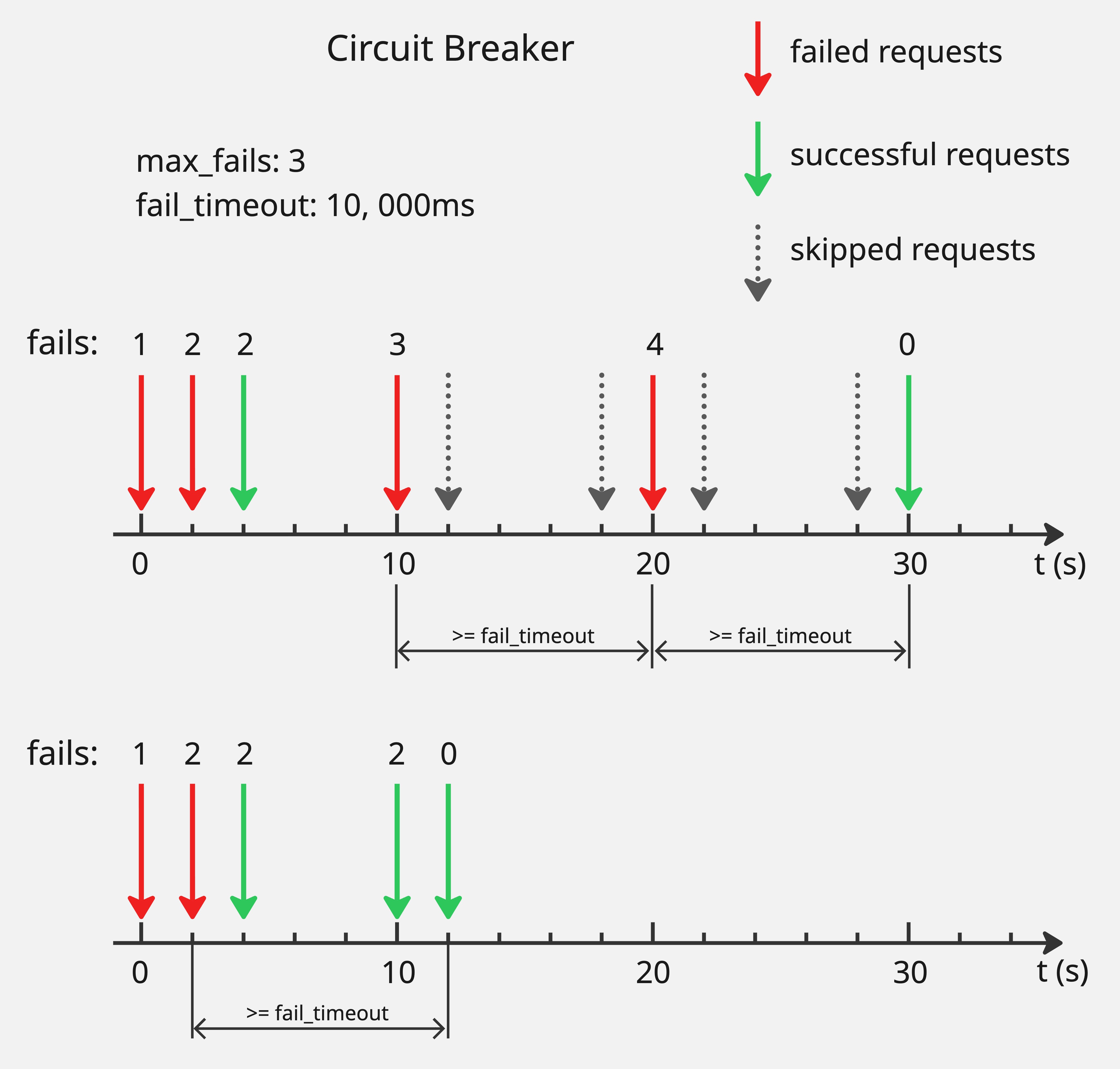
Consider an example where config.balancer.max_fails is 3 and config.balancer.fail_timeout is 10 seconds. When failed requests for a target reach 3, the target is marked unhealthy and the load balancer stops sending requests to it. After 10 seconds, the target is reconsidered. If the request to this target still fails, the target remains unhealthy and the load balancer continues to exclude it. If the request succeeds, the target is marked healthy again and recovers from the circuit breaker.
The failure counter tracks total failures, not consecutive failures. If a target receives 2 failed requests, then 1 successful request within the timeout window, the counter remains at 2. The counter resets only when a successful request occurs after config.balancer.fail_timeout has elapsed since the last failed request.
If all targets become unhealthy simultaneously, requests fail with HTTP 500.