Embedding-based similarity matching in AI Gateway

Uses: AI Gateway
Related Documentation
Minimum Version
AI Gateway - 2.0
Incompatible with
on-prem
Previous Versions of this page

Vector embeddings represent text as points in high-dimensional space, where the distance between vectors reflects semantic similarity. This enables semantic search, which compares meaning rather than exact words and powers LLM workflows like intelligent caching, retrieval, classification, and anomaly detection.

Vector embeddings example

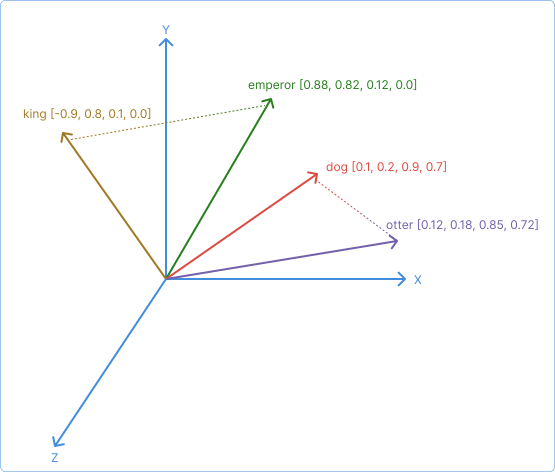
Figure 1: A simplified representation of vector text embeddings in a three-dimensional space.

For example, in Figure 1, “king” and “emperor” are semantically more similar than “king” is to “otter”. Similarity is measured using techniques like cosine similarity or Euclidean distance, which quantify the relationship between vectors.

Semantic similarity in AI Gateway

Based on meaning rather than exact matches, AI Gateway can perform intelligent request routing, caching, and content filtering using semantic similarity queries. An AI Model can leverage semantic similarity in two ways:

  1. Semantic load balancing: Route requests to upstream providers based on how semantically similar the prompt is to each provider’s capabilities, using the semantic load balancing algorithm.
  2. Semantic Policies: Attach AI Policies like AI Semantic Cache or AI Semantic Prompt Guard to add similarity-based caching, retrieval-augmented generation (RAG), and guardrails.

Vector databases

To store and compare embeddings efficiently, AI Gateway semantic features rely on vector databases. These specialized datastores index high-dimensional embeddings and enable fast similarity search based on distance metrics like cosine similarity or Euclidean distance. An AI Model entity’s semantic load balancer stores vector representations of each target model’s semantic description at configuration time, and uses the vector database to compare incoming prompts against those stored vectors.

Semantic policies also use vector databases to perform similarity searches at request time. The selected database stores the embeddings generated by the AI Model or AI Policies (either at config time or runtime), and determines the accuracy and performance of semantic operations.

A vector database stores and compares vector embeddings—numerical representations of text, prompts, documents, or other content. When you configure semantic features in AI Models or AI Policies, embeddings are generated and stored in the vector database so that incoming requests can be compared against the stored vectors to find semantically similar matches. For example, an incoming prompt is embedded and compared against cached prompt keys, model descriptions, document chunks, or allow/deny lists to determine semantic similarity.

AI Gateway semantic features support the following vector databases:

  • Using vectordb.strategy: redis and parameters in vectordb.redis:
    • Redis with Redis Vector Search
    • Redis Cloud
    • Valkey: When you configure vectordb.strategy: redis, Kong Gateway queries the server and checks the server name field. If it detects Valkey request, it automatically uses the Valkey-specific driver.
    • Managed Redis with cloud authentication:
      • AWS ElastiCache (auth_provider: aws)
      • Azure Managed Redis (auth_provider: azure)
      • Google Cloud Memorystore (auth_provider: gcp)

      For configuration details, see Using cloud authentication with Redis.

  • Using vectordb.strategy: pgvector and parameters in vectordb.pgvector:

Configure vector database settings in AI Models and AI Policies to enable semantic similarity features.

What data is compared for similarity?

Each AI Policy applies similarity search slightly differently depending on its goal. These comparisons determine whether the AI Policy routes, blocks, reuses, or enriches a prompt based on meaning rather than syntax.

The following table describes how each AI Gateway Policy compares embeddings:

Semantic feature

Incoming data

Compared against

AI Model semantic load balancing Incoming prompts Stored embeddings of each target model’s semantic description
AI Semantic Cache Policy Incoming prompts Cached prompt keys
AI RAG Injector Policy Incoming prompts Vectorized document chunks
AI Semantic Prompt Guard / Response Guard Policies Request content or responses Vectorized allow/deny lists

How semantic similarity is applied

Semantic similarity is used differently depending on the feature:

AI Model semantic load balancing (semantic algorithm):

  • Generates embeddings for each target model’s semantic description at configuration time and stores them in the vector database.
  • At request time, embeds the incoming prompt using the same embedding model and compares it against the stored target embeddings.
  • Routes requests to the target whose description is most semantically similar to the prompt, using the distance metric (cosine or Euclidean) configured for the Model.
  • The quality of routing depends on semantic description quality and consistent use of the same embedding model for both targets and prompts.

Semantic Policies:

  • Each semantic Policy uses similarity search slightly differently based on its goal.
  • AI Semantic Cache compares prompts against cached prompt keys to find reusable responses.
  • AI RAG Injector compares prompts against vectorized document chunks to retrieve relevant context.
  • AI Semantic Prompt Guard and AI Semantic Response Guard compare content against vectorized allow and deny lists to detect misuse patterns semantically.

Dimensionality

Embedding models work by converting text into high-dimensional floating-point arrays where mathematical distance reflects semantic relationship. In other words, ingested text data becomes points in a vector space, which enables similarity searches in vector databases, and the dimension of embeddings plays a critical role for this.

Dimensionality determines how many numerical features represent each piece of content, similar to how a detailed profile might have dimensions for age, interests, location, and preferences. A higher number of dimensions creates more detailed “fingerprints” that capture nuanced relationships. Smaller distances between vectors indicate stronger conceptual similarity and larger distances show weaker associations.

For example, this request to the OpenAI /embeddings API via AI Gateway:

{
    "input": "Tell me, Muse, of the man of many ways, who was driven far journeys, after he had sacked Troy’s sacred citadel.",
    "model": "text-embedding-3-large",
    "dimensions": 20
}

Creates the following embedding:

{
	"object": "list",
	"data": [
		{
			"object": "embedding",
			"index": 0,
			"embedding": [
				0.26458353,
				-0.062855035,
				-0.14282244,
				0.18218088,
				-0.41043353,
				0.3704169,
				0.1712553,
				-0.10945333,
				-0.00060006406,
				0.10076551,
				-0.0697658,
				0.1779686,
				-0.3464596,
				0.028745485,
				0.3017042,
				0.2543161,
				-0.20916577,
				-0.06255886,
				-0.21469438,
				0.32934725
			]
		}
	],
	"model": "text-embedding-3-large",
	"usage": {
		"prompt_tokens": 28,
		"total_tokens": 28
	}
}

The embedding array contains 20 floating-point numbers, each one representing a dimension in the vector space.

For simplicity, this example uses a reduced dimensionality of 20, though production models typically use 1536 or more.

Accuracy and performance considerations

If you use embedding models that support defining the dimensionality of the embedding output, you should consider how to balance accuracy and performance based on your use case.

However, extremes at the far ends of the spectrum present significant drawbacks:

Dimensionality range

Benefits

Drawbacks

Lower dimensionality (2–10 dimensions)
  • Improves speed and performance
  • Works well for simpler tasks like basic keyword matching or simple images, where hundreds of dimensions may suffice.
  • Can be too simplistic, like calling a movie simply “good” or “bad”
  • Might miss important nuance and lead to less accurate matches
Higher dimensionality (10,000+ dimensions)
  • Improves the granularity and nuance of similarity searches
  • Useful for complex tasks like semantic text understanding or detailed images, where thousands of dimensions are often required.
  • Increases storage and computation costs
  • Can suffer from the “curse of dimensionality”, where differences become less meaningful.

Use moderate dimensionality when possible, and tune it based on both the complexity of your data and the responsiveness required by your application.

Cosine and Euclidean similarity

AI Gateway supports both cosine similarity and Euclidean distance for vector comparisons, allowing you to choose the method best suited for your use case. You can configure the method using the config.vectordb.distance_metric setting in the respective AI Policy.

  • Use cosine for nuanced semantic similarity (for example, document comparison, text clustering), especially when content length varies or dataset diversity is high.
  • Use euclidean when magnitude matters (for example, images, sensor data) or you’re working with dense, well-aligned feature sets.

Cosine similarity

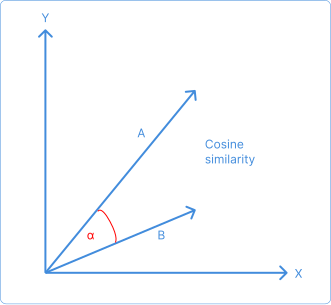
Cosine similarity measures the angle between vectors, ignoring their magnitude. It is well-suited for semantic matching, particularly in text-based scenarios. OpenAI recommends cosine similarity for use with the text-embedding-3-large model.
Cosine similarity example

Figure 2: Visualization of cosine similarity as the angle between vector directions.

Cosine tends to perform well across both low and high dimensional space, especially in high-diversity datasets because it captures vector orientation rather than size. This can be useful, for example, when comparing texts about Microsoft, Apple, and Google.

Euclidean distance

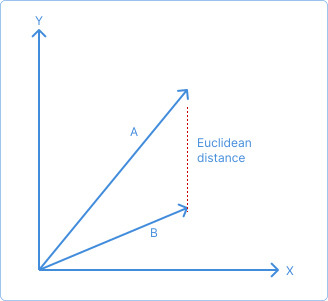
Euclidean distance measures the straight-line (L2) distance between vectors and is sensitive to magnitude. It works better when comparing objects across broad thematic categories, such as Technology, Fruit, or Musical Instruments, and in domains where absolute distance is important.
Euclidean similarity example

Figure 3: Visualization of Euclidean distance between vector points.

Differences between cosine and euclidean

The two graphs below illustrate a key difference between cosine similarity and Euclidean distance: two vectors can have the same angle (and thus the same cosine similarity, represented as γ below) while their Euclidean distances may differ significantly. This happens because cosine similarity measures only the direction of vectors, ignoring their length or magnitude, whereas Euclidean distance reflects the actual straight-line distance between points in space.
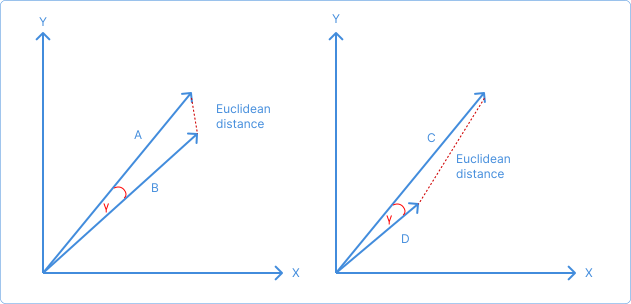
Comparing cosine and Euclidean similarity

Figure 4: Two vectors with equal cosine similarity (γ) but different Euclidean distances.

The following table will help you determine which embedding similarity metric you should use based on your use cases:

Similarity metric

Recommended use cases

Cosine similarity
  • Find semantically similar news articles regardless of length
  • Recommend products to users with similar taste profiles
  • Identify documents with overlapping topics in large corpora
  • Compare diverse text embeddings (for example, Microsoft vs. Apple)
Euclidean distance
  • Find images with similar color distributions and intensity
  • Detect anomalies in sensor readings where magnitude matters
  • Compare aligned image patches using raw pixel embeddings

Similarity threshold

The config.vectordb.threshold parameter controls how strictly the vector database evaluates similarity during a query. It is passed directly to the vector engine (such as Redis or PostgreSQL with pgvector) and defines which results qualify as matches. In Redis, for example, this maps to the distance_threshold query parameter. By default, Redis sets this to 0.2, but you can override it to suit your use case.

The threshold defines how permissive the matching is. Higher threshold values allow looser matches, while lower values enforce stricter matching. The threshold range is 0 to 1.

  • With cosine similarity, AI Gateway uses cosine distance (1 - cosine similarity) as the comparison metric. The threshold sets the maximum allowable distance between embeddings. A value of 0 requires exact matches only (zero distance). A value of 1 allows matches with any similarity level (up to maximum distance). Typical configurations use 0.1–0.2 for strict matching and 0.5–0.8 for broader matching.

  • For Euclidean distance, the threshold is normalized to a 0–1 range and sets the maximum allowable distance between embedding vectors. A value of 0 requires exact matches (zero distance). A value of 1 permits the broadest possible matches. Typical configurations use 0.1–0.2 for strict matching and 0.5–0.8 for broader matching.

In both cases, if the AI Gateway logs indicate “no target can be found under threshold X,” increase the threshold value to allow more matches.

The optimal threshold depends on the selected distance metric, the embedding model’s dimensionality, and the variation in your data. Tuning may be required for best results.

In AI Gateway semantic AI Policies, this threshold is not post-processed or filtered by the AI Policy itself. The AI Policy sends it directly to the vector database, which uses it to determine matching documents based on the configured distance metric.

Threshold sensitivity and cache hit effectiveness

The closer your similarity threshold is to 1, the more likely you are to get cache misses when using the AI Semantic Cache Policy. This is because a higher threshold makes the similarity filter more strict, so only embeddings that are nearly identical to the query will qualify as a match. In practice, this means even small variations in phrasing, structure, or context can cause the system to miss otherwise semantically similar entries and fall back to calling the LLM again.

This happens because vector embeddings are not perfectly robust to minor semantic shifts, especially for short or ambiguous prompts. Raising the threshold narrows the match window, so you’re effectively demanding a near-exact match in a complex vector space, which is rare unless the input is repeated verbatim.

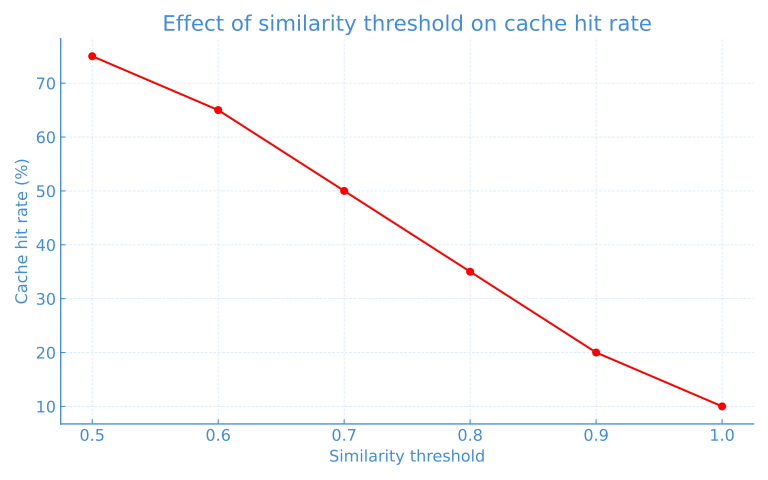
The chart below illustrates this effect: as the similarity threshold increases (for example, becomes more strict), the cache hit rate typically falls. This reflects the broader acceptance of matches in the embedding space, which helps reduce redundant LLM calls at the cost of some semantic looseness.

Similarity threshold and cache rate hits

Figure 5: As the similarity threshold decreases (becomes more permissive), cache hit rate increases. This illustrates the trade-off between strict semantic matching and LLM efficiency.

This is generally true but not absolute. If you’re working in a very narrow domain where inputs are highly repetitive or templated (for example, support FAQs), a low threshold might still yield good cache hit rates. Conversely, in open-ended chat or creative domains, a stricter threshold will almost always increase cache misses due to natural language variability.

Limitations

Embedding-based similarity works well for many use cases, but it has limitations. It typically can’t capture subtle semantic changes or handle long context as well as LLMs can.

For example, the following prompts may be considered semantically equivalent by a vector similarity search, even though the latter asks for additional detail:

  • Summarize this article.
  • Summarize this article. Tell me more.

To address these edge cases, you can use a smaller LLM model to compare two texts side-by-side, enabling deeper semantic comparison.

Help us make these docs great!

Kong Developer docs are open source. If you find these useful and want to make them better, contribute today!