Kong AI assistant
Kong’s AI assistant, KAi, can detect issues, suggest fixes, and accelerate your workflows all without leaving the Konnect UI. KAi is enabled by default for Konnect Plus and trial accounts. KAi is always disabled by default for Enterprise accounts. Enterprise accounts can enable KAi by contacting their Kong account manager or enabling it in Konnect Labs.
KAi can help you do the following:
- Find information on Konnect: Ask questions about Konnect features, settings and configurations.
- Explore gateway entities: View and explore API gateway entities: Services, Routes, plugins, and more.
- Debug and analyze API traffic: Get real-time insights and troubleshoot performance bottlenecks and issues.
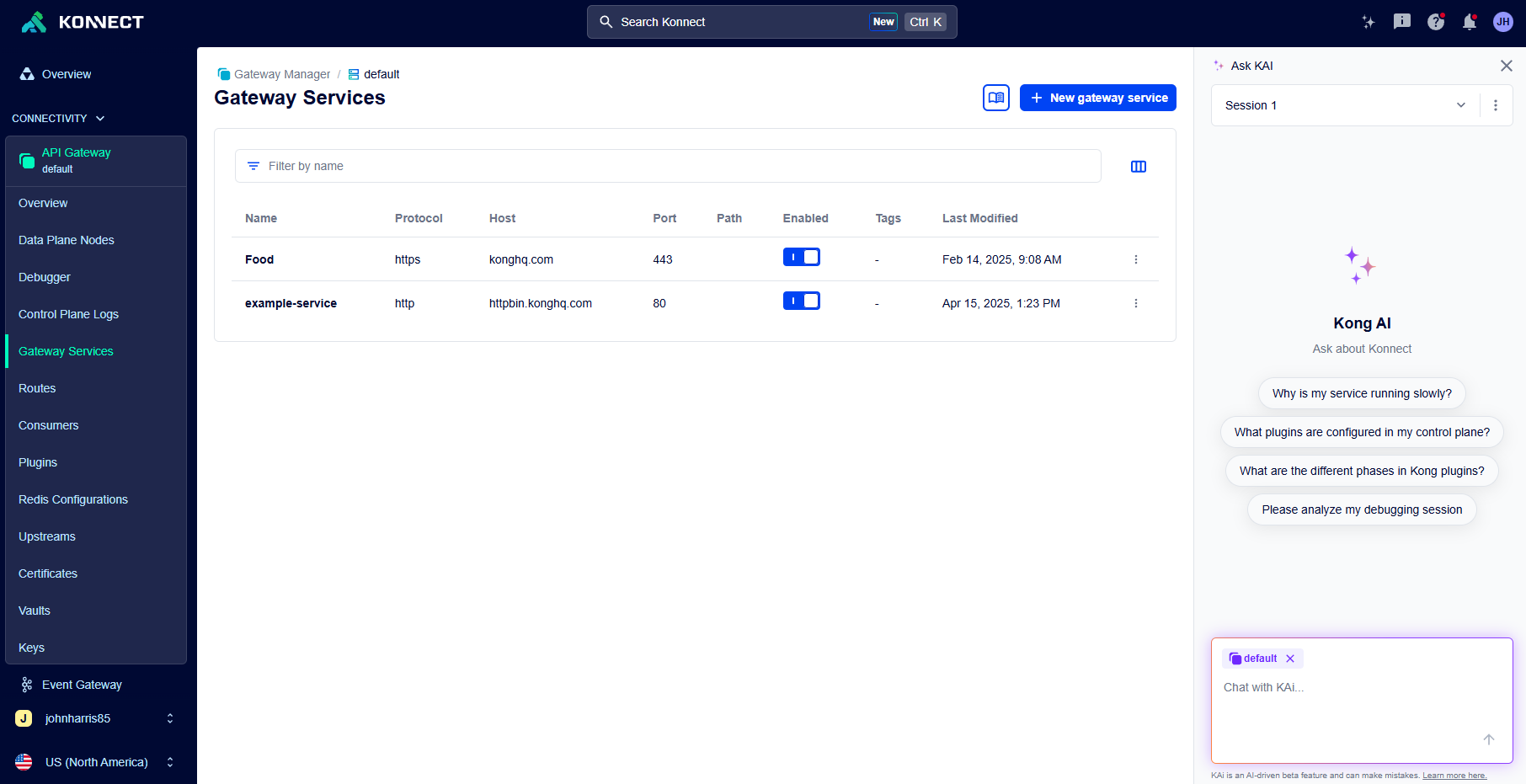
How KAi works
KAi is made up of a series of components running inside Konnect. The agent can perform smart orchestration and analysis of Konnect data and entities. You can interact with the agent in the following ways:
- Use the chat in the Konnect UI by clicking Ask KAi on the top right.
- Use the
kongctlcommand-line tool with thekongctl kaicommand.
The KAi agent uses backend LLMs for reasoning and natural language tasks. It also uses a Konnect MCP server to provide information about Konnect and the user’s entities and data. Because the MCP server is authenticated via the logged-in user’s session, it only has access to data and resources that the user themselves has permission to access.
KAi also has access to Kong’s documentation and support knowledge base, so it can provide guidance on configuration, architecture, and troubleshooting.
Like other AI chatbots, KAi uses sessions. KAi can remember context within a session, but doesn’t share context between sessions. You can have a maximum of three current sessions with KAi.
flowchart LR
  subgraph backends["Backends & data sources"]
    direction LR
    LLM["LLM backend"]
    MCP["Konnect MCP Server"]
    KB["Kong Docs & support knowledge base"]
  end

  subgraph kai["KAi Agent"]
    direction LR
    UI["Konnect UI chat"]
    CLI["kongctl kai"]
  end

  User(("User"))

  User --> kai
  kai --> backends
  click MCP "/konnect-platform/konnect-mcp/"
How to interact with KAi in the UI
To start a chat with KAi, click Ask KAi on the top right of the Konnect UI.
KAi is context-sensitive, so if you navigate to a control plane or Gateway Service, KAi will use that entity context to answer questions. We recommend adding context, like your control plane, to get the best possible answer from KAi. You can create a new session from the Active session dropdown menu by selecting “New conversation”. Each user is limited to three sessions. To delete a session, click the action menu icon next to the session and click Delete.
Use the Konnect MCP Server with external tools
The same Konnect MCP Server that powers KAi is available for use with external AI assistants and IDE copilots. This allows you to interact with your Konnect resources directly from your development environment.
With the MCP server, you can:
- Query gateway entities (control planes, Gateway Services, Routes, Consumers, plugins)
- Create and analyze debug sessions for performance issues
- Search Kong documentation
- Analyze API traffic
Supported product areas
KAi can help you in the following product areas:
- Gateway control planes
- Gateway configurations (Services, Routes, Vaults, Consumers, Debugger)
What's new in KAi
The following are the latest changes in KAi:
- Beta trial is available for Enterprise accounts in Konnect Labs.
For a complete changelog of all KAi releases, see the KAi changelog.
Example prompts
Use the following example prompts to get started with KAi:
Debugging & performance:
- Why is my
/api/checkoutendpoint slow? Create a debugging session, focusing on high-latency requests, and summarize where time is being spent. - Help me diagnose intermittent 502s on my
ROUTE_NAMERoute. - What is the plugin execution order for my
ROUTE_NAMERoute? - Why are Consumers in
CONSUMER_GROUPgetting 401s? Walk me through likely causes and how to verify them in Konnect.
Configuration discovery:
- What plugins affect the
ROUTE_NAMERoute? List them in order and explain what each one does. - Show me all rate limiting plugins across production control planes.
- List all Routes associated with the
SERVICE_NAMEGateway Service and tell me which auth and security plugins apply to each.
Security & governance checks:
- Audit my
CONTROL_PLANEcontrol plane for common security misconfigurations (for example: auth missing, weak TLS, or overly broad CORS). Suggest prioritized fixes. - Check if any Routes in my
CONTROL_PLANEcontrol plane expose endpoints without authentication, and list them. - Suggest a safe baseline policy set for a public API (rate limiting, authentication, and logging) and show how to apply it to the
SERVICE_NAMEGateway Service.
Questions about Konnect:
- How do I set up the plugin
PLUGIN_NAMEin Konnect for a particular use case? Give me the exact steps and the limitations. - Explain the difference between Gateway Service vs Route in Konnect, with an example from my current control plane.
- What’s the recommended way to troubleshoot
upstream timed outerrors in Kong Gateway? - Search the Kong docs for best practices on rate limiting and summarize the key steps for my setup.
Frequently asked questions
Is the KAi AI assistant enabled by default?
It is enabled by default for Konnect Plus and trial accounts. Only organization owners can choose to enable or disable KAi for an organization. KAi is always disabled by default for Enterprise accounts. Enterprise accounts can enable it by contacting their Kong account manager or by enabling it in Konnect Labs.
Does KAi automatically modify Konnect configuration when it finds an issue?
No. KAi can start a debug sesssion, but will not make any changes to your Konnect configuration.
Can all users see the same resources with the AI assistant KAi?
No. Users can only see the Konnect entities in KAi that they have permissions to via teams and roles. For example, if a user is a Portal Admin, they can see Dev Portal entities, but they can’t ask KAi about control planes.
Is there an additional cost to using KAi?
During the Beta period, access to KAi is included in your existing Plus and Trial plans. Enterprise users should contact their Kong account manager or enable it in Konnect Labs.
Does KAi train on any of my data?
No. Neither Kong nor any downstream LLMs that KAi uses train on user data.
Which models does KAi use?
We currently use Anthropic Claude provided by AWS Bedrock. Review the Terms for Anthropic on the AWS Third-Party Models page.
What regions is KAi available in?
KAi is currently available in US, EU, and AU. Other regions will be added as the product moves out of Beta.