MCP servers for your APIs
AI agents are rapidly becoming core components of modern software, driving the need for structured, reliable interfaces to access tools and data. The Model Context Protocol (MCP) addresses this by enabling agents to reason, plan, and act across services.
Kong offers two ways to expose APIs as MCP servers, depending on where the API lives and who’s consuming it:
- AI Gateway: Convert any Gateway API into an MCP server, then apply security, governance, and observability controls with Kong Gateway plugins. Best for production MCP traffic that needs enterprise-grade control.
- Dev Portal: Generate an MCP server directly from the APIs already published to a Dev Portal, so developers can connect their own agents to browse and use them. See Dev Portal MCP servers.
Bring MCP servers to production securely with AI Gateway
AI Gateway enables teams to manage remote MCP traffic with enterprise-grade security, performance, authentication, context propagation, load balancing, and observability.
Learn how to:
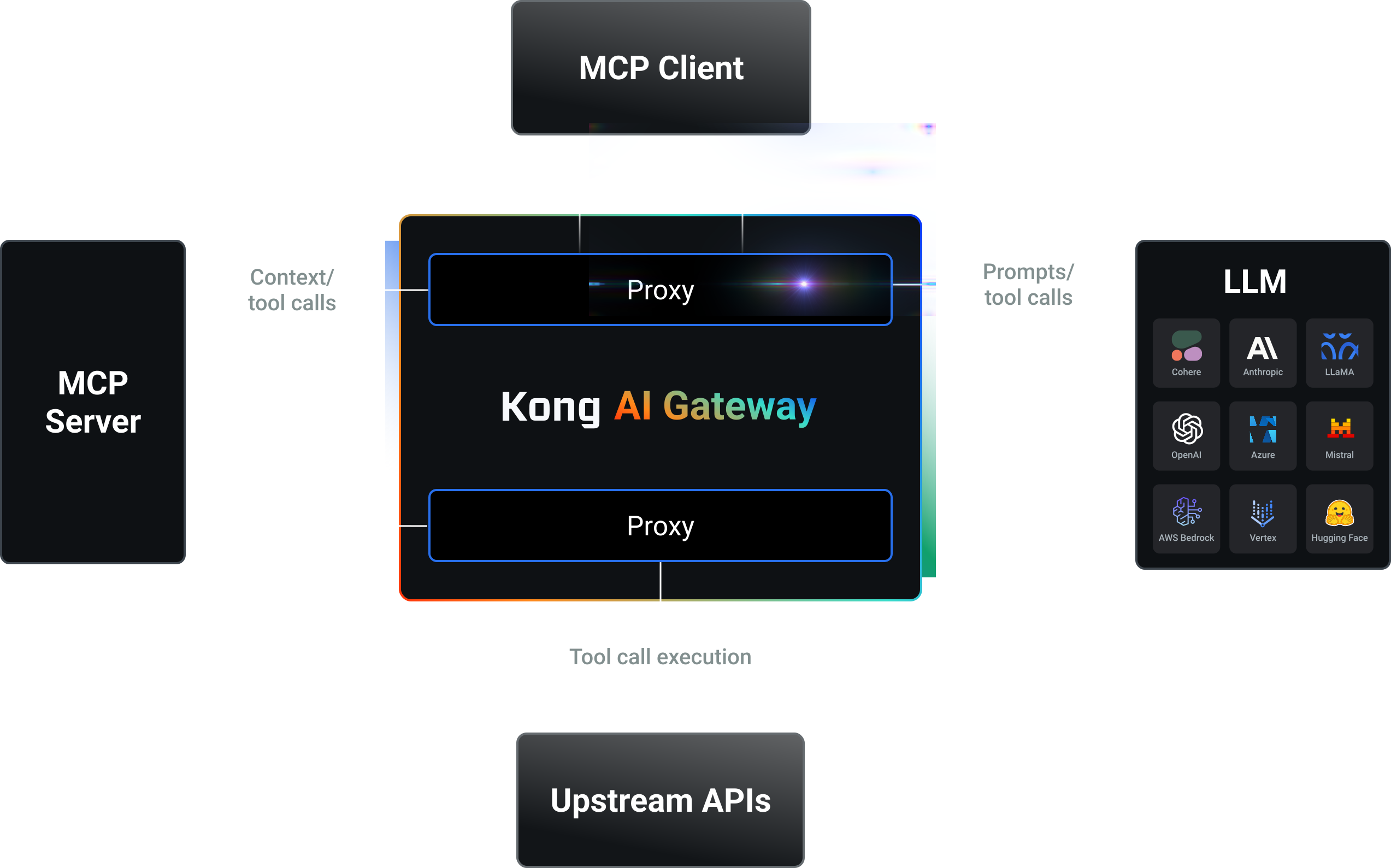
Create MCP servers from your APIs
Choose the approach that matches where your API lives: use AI Gateway to convert any Gateway API into an MCP server without writing custom code, or use Dev Portal to generate an MCP server directly from APIs you’ve already published, without any AI Gateway configuration.
Map APIs to MCP servers using AI MCP Proxy
With AI Gateway, turn any API into an MCP server using the AI MCP Proxy plugin. This approach does not require an LLM and provides full control over production workloads.
The AI MCP Proxy plugin:
- Converts API schemas into MCP-compatible tool definitions.
- Aggregates multiple APIs into a single MCP server endpoint.
- Supports serverless deployments for dynamic tool generation.
- Integrates with AI assistants like Claude Desktop and other MCP clients.
Create MCP tools from any API using AI MCP plugins
Explore guides to create MCP servers and tools without custom code, using AI Gateway.
Generate MCP servers from Dev Portal APIs
With Dev Portal, generate an MCP server directly from the APIs already published to it. Developers connect their own agent or IDE to browse and use what they already have access to, respecting the same authentication and access control that applies to them.
See Dev Portal MCP servers for details.
Generate an MCP server from Dev Portal APIs
Learn what a Dev Portal MCP server exposes and how to enable one.
Apply security, governance, and observability controls to MCP servers
With AI Gateway, use available Kong Gateway plugins to:
- Secure access with the AI MCP OAuth2 plugin or other authentication methods.
- Monitor MCP traffic using AI metrics and AI audit logs.
- Enforce access controls for MCP tool usage.
- Govern usage with rate limiting and traffic control plugins.
Secure and govern your MCP traffic
Apply security, governance, and observability to MCP servers that route LLM requests through AI Proxy plugins, using AI Gateway.
MCP traffic observability
AI Gateway records detailed Model Context Protocol (MCP) traffic data so you can analyze how requests are processed and resolved.
- Logs capture session IDs, JSON-RPC method calls, payloads, latencies, and errors.
- Metrics track latency, response sizes, and error counts over time, giving you a complete view of MCP server performance and behavior.