AI Gateway provides load balancing capabilities to distribute requests across multiple LLM models. You can use these features to improve fault tolerance, optimize resource utilization, and balance traffic across your AI systems.
In AI Gateway, load balancing is configured on the AI Model entity through config.balancer and targets.
Load balancing algorithms
AI Gateway supports multiple load balancing strategies for distributing traffic across AI models. Each algorithm addresses different goals: balancing load, improving cache-hit ratios, reducing latency, or providing failover reliability.
The following table describes the available algorithms for AI Model entities and considerations for selecting one.
|
Algorithm |
Description |
Considerations |
|---|---|---|
| Round-robin (weighted) |
Distributes requests across models based on their assigned weights. For example, if models gpt-4, gpt-4o-mini, and gpt-3 have weights of 70, 25, and 5, they receive approximately 70%, 25%, and 5% of traffic respectively. Requests are distributed proportionally, independent of usage or latency metrics.
|
|
| Consistent-hashing |
Routes requests based on a hash of a configurable header value. Requests with the same header value are routed to the same model, enabling sticky sessions for maintaining context across user interactions. The hash_on_header setting defines the header to hash. The default is X-Kong-LLM-Request-ID.
|
|
| Least-connections |
Tracks the number of in-flight requests for each backend and routes new requests to the backend with the highest spare capacity. The weight parameter is used to calculate connection capacity.
|
|
| Lowest-usage |
Routes requests to models with the lowest measured resource usage. The tokens_count_strategy parameter defines how usage is measured: prompt tokens, completion tokens, total tokens (the default), cost, or an LLM-accuracy score.
|
|
| Lowest-latency |
Routes requests to the model with the lowest observed latency. The latency_strategy parameter defines how latency is measured. The default (tpot) uses time-per-output-token. The e2e option uses end-to-end response time.
The algorithm uses peak EWMA (Exponentially Weighted Moving Average) to track latency from TCP connect through body response. Metrics decay over time. |
|
| Semantic |
Routes requests based on semantic similarity between the prompt and model descriptions. Embeddings are generated using a specified model (for example, text-embedding-3-small), and similarity is calculated using vector search.
Multiple targets can share identical descriptions. When they do, the balancer performs round-robin fallback among them if the primary target fails. Weights affect fallback order. |
|
| Priority |
Routes requests to models based on assigned priority groups. The balancer always selects from the highest-priority group first. If all targets in that group are unavailable, it falls back to the next group. Within each group, the weight parameter controls traffic distribution.
|
|
For examples of each algorithm, see Algorithm examples in the AI Model entity reference.
Request routing rules
Routing rules allow clients to send an alias instead of the actual model name in the request. This decouples the external model identifier from the internal provider model, enabling flexible routing without changing client code.
An AI Model can have an optional config.route.model field, matching on the request body, a header, or the path. For example, when config.route.model is set to { body_param: model, values: [alias-value] } and a client sends "model": "alias-value" in the request body, AI Gateway routes to the matching AI Model. This feature works independently of load balancing algorithms. The routing rule determines which AI Model (or target set) handles the request, and the configured load balancing algorithm selects the final backend within that set.
Retry and fallback
The load balancer includes built-in support for retries and fallbacks. When a request fails, the balancer can automatically retry the same target or redirect the request to a different target model.
How retry and fallback works
- Client sends a request.
- The load balancer selects a target based on the configured algorithm (round-robin, lowest-latency, etc.).
-
If the target fails (based on defined
failover_criteria), the balancer:- Retries the same or another target.
- Fallbacks to another available target.
- If retries are exhausted without success, the load balancer returns a failure to the client.
flowchart LR
    Client(((Application))) --> LBLB
    subgraph AIGateway
        LBLB[/Load Balancer/]
    end
    LBLB -->|Request| AIProvider1(AI Model Provider 1)
    AIProvider1 --> Decision1{Is Success?}
    Decision1 -->|Yes| Client
    Decision1 -->|No| AIProvider2(AI Model Provider 2)
    subgraph Retry
        AIProvider2 --> Decision2{Is Success?}
    end
    Decision2 ------>|Yes| Client
Figure 1: A simplified diagram of fallback and retry processing in AI Gateway’s load balancer.
Retry and fallback configuration
The AI Gateway load balancer supports fine-grained control over failover behavior on the Model entity. Use failover_criteria to define when a request should retry on the next target model. By default, retries occur on error and timeout. An error means a failure occurred while connecting to the server, forwarding the request, or reading the response header. A timeout indicates that any of those stages exceeded the allowed time.
You can add more criteria to adjust retry behavior as needed:
|
Setting |
Description |
|---|---|
retries
|
Defines how many times to retry a failed request before reporting failure to the client. Increase for better resilience to transient errors; decrease if you need lower latency and faster failure. |
failover_criteria
|
Specifies which types of failures (e.g., http_429, http_500) should trigger a failover to a different target.
Customize based on your tolerance for specific errors and desired failover behavior.
|
connect_timeout
|
Sets the maximum time allowed to establish a TCP connection with a target. Lower it for faster detection of unreachable servers; raise it if some servers may respond slowly under load. |
read_timeout
|
Defines the maximum time to wait for a server response after sending a request. Lower it for real-time applications needing quick responses; increase it for long-running operations. |
write_timeout
|
Sets the maximum time allowed to send the request payload to the server. Increase if large request bodies are common; keep short for small, fast payloads. |
Retry and fallback scenarios
You can customize the AI Gateway load balancer to fit different application needs, such as minimizing latency, enabling sticky sessions, or optimizing for cost. The table below maps common scenarios to key configuration options that control load balancing behavior:
|
Scenario |
Action |
Description |
|---|---|---|
| Requests must not hang longer than 3 seconds |
Adjust connect_timeout, read_timeout, write_timeout
|
Shorten these timeouts to quickly fail if a target model is slow or unresponsive, ensuring faster error handling and responsiveness. |
| Prioritize the lowest-latency target |
Set latency_strategy to e2e
|
Optimize routing based on full end-to-end response time, selecting the target that minimizes total latency. |
| Need predictable fallback for the same user |
Use hash_on_header
|
Ensure that the same user consistently routes to the same target model, enabling sticky sessions and reliable fallback behavior. |
| Models have different costs |
Set tokens_count_strategy to cost
|
Route requests by considering cost, balancing model performance with budget targets. |
Health check and circuit breaker
For AI Model entity, circuit breaker behavior is controlled through the balancer configuration on the AI Model. Use these settings to fail fast when a target model is unhealthy and to retry or fall back to another target instead of waiting for repeated slow responses.
|
Setting |
Use |
|---|---|
connect_timeout, read_timeout, write_timeout
|
Reduce how long AI Gateway waits before treating a target model as unavailable. |
max_fails
|
Set the number of failed attempts allowed before AI Gateway marks a target model unhealthy. |
fail_timeout
|
Set how long AI Gateway keeps a target model in a failed state before trying it again. |
The load balancer supports health checks and circuit breakers to improve reliability. If the number of unsuccessful attempts to a target reaches config.balancer.max_fails, the load balancer stops sending requests to that target until it reconsiders the target after the period defined by config.balancer.fail_timeout. The diagram below illustrates this behavior:
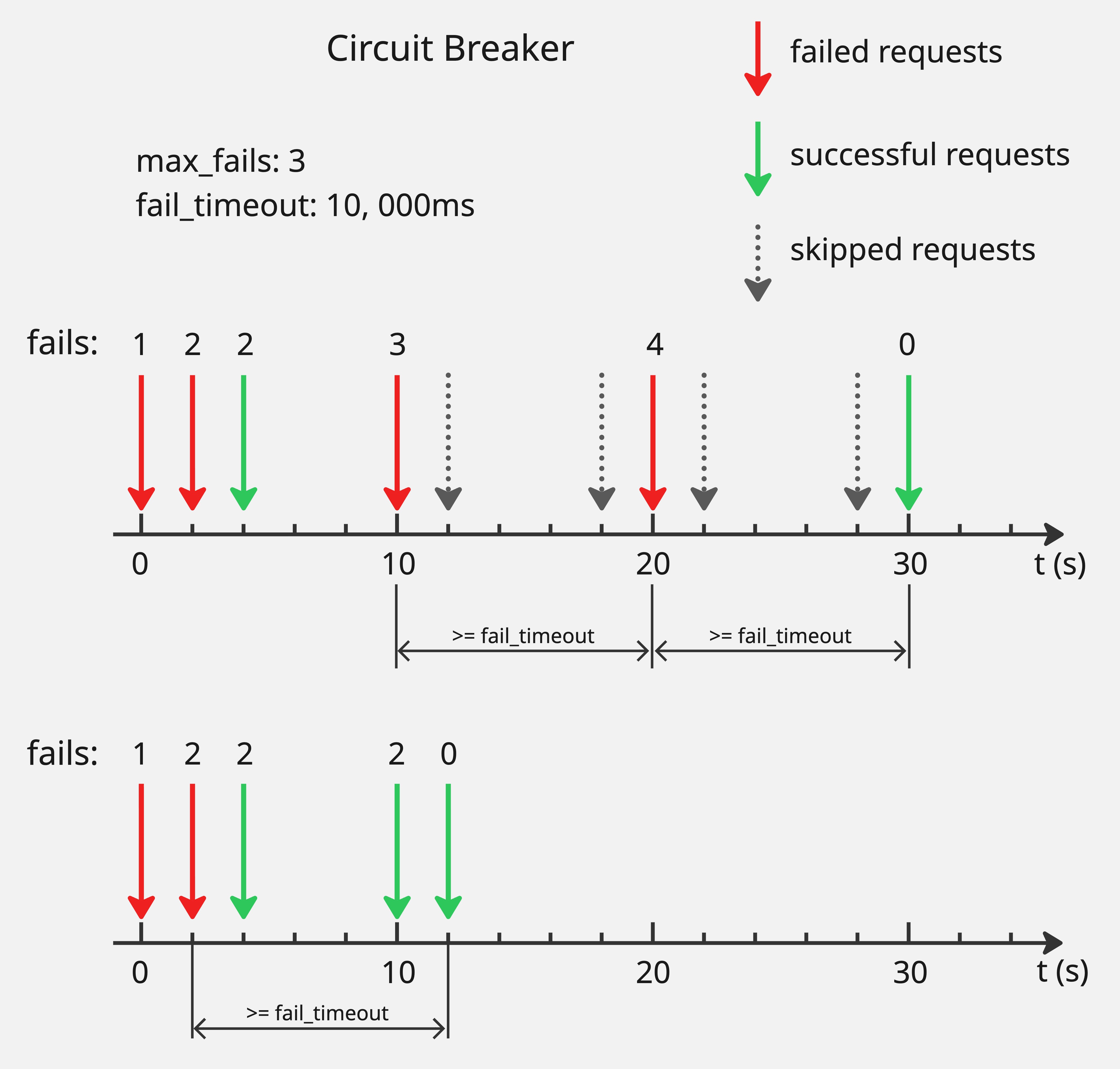
Consider an example where config.balancer.max_fails is 3 and config.balancer.fail_timeout is 10 seconds. When failed requests for a target reach 3, the target is marked unhealthy and the load balancer stops sending requests to it. After 10 seconds, the target is reconsidered. If the request to this target still fails, the target remains unhealthy and the load balancer continues to exclude it. If the request succeeds, the target is marked healthy again and recovers from the circuit breaker.
The failure counter tracks total failures, not consecutive failures. If a target receives 2 failed requests, then 1 successful request within the timeout window, the counter remains at 2. The counter resets only when a successful request occurs after config.balancer.fail_timeout has elapsed since the last failed request.
If all targets become unhealthy simultaneously, requests fail with HTTP 500.